
You can not select more than 25 topics
Topics must start with a letter or number, can include dashes ('-') and can be up to 35 characters long.
106 lines
4.4 KiB
106 lines
4.4 KiB
## Offband Meshcore 1.2.0
|
|
|
|
Our biggest release yet. A ground-up interface redesign, a real database under the
|
|
hood, GIFs that work across every MeshCore client, and hands-on control of your
|
|
radio's RF front end. This is also the first Offband release built, signed, and
|
|
shipped to every platform automatically.
|
|
|
|
|
|
|
|
### One app, every platform
|
|
|
|
From this release on, every Offband build ships everywhere at once, signed with
|
|
the same key so updates just work:
|
|
|
|
- **Android**: install from Google Play or sideload the signed APK
|
|
- **Windows**: desktop build
|
|
- **Linux**: desktop build
|
|
- **Web**: run it right in your browser, no install, at [offband.app](https://offband.app)
|
|
|
|
Pick your platform below.
|
|
|
|
### A brand-new interface
|
|
|
|
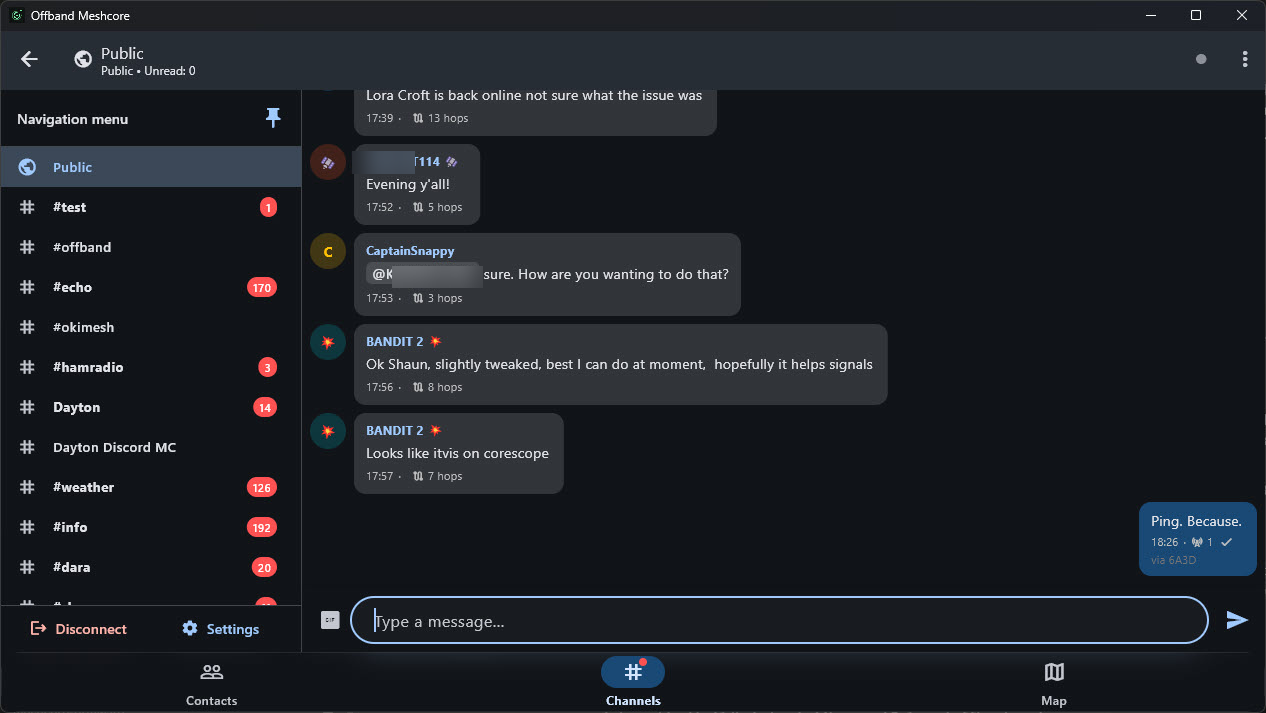
The headline feature. Offband has been rebuilt around a modern navigation shell
|
|
that finally gets out of your way.
|
|
|
|
- A **left rail** you open from the hamburger button, and can **pin open** so it
|
|
lives right alongside your conversation instead of covering it.
|
|
- Your **channels live in the rail** and switch **in place**, so jumping between
|
|
channels never loses your spot or your scroll position.
|
|
- Map layer toggles, Disconnect, and Settings all found sensible new homes in the
|
|
panel, and the back button finally behaves the way it should: it backgrounds
|
|
the app instead of killing it, and never knocks you off a connected radio.
|
|
|
|
### Your data, on solid ground
|
|
|
|
Under the surface, Offband now keeps your messages, contacts, and channels in a
|
|
real SQLite database instead of a pile of loose preference files.
|
|
|
|
- Your **existing data migrates automatically** the first time you open this
|
|
version. Nothing is thrown away, and your **full message history is preserved**.
|
|
- Storage problems that used to fail silently now surface, so nothing goes wrong
|
|
in the dark.
|
|
- On desktop, your data no longer gets swept into OneDrive/Documents sync.
|
|
|
|
### GIFs everyone can see
|
|
|
|
GIFs are no longer an Offband-only party trick.
|
|
|
|
- Send a GIF and it goes out as a **plain Giphy link**, so people on **stock
|
|
MeshCore and other clients can tap it and watch it** too, not just Offband
|
|
users.
|
|
- Paste a **Giphy or Tenor** link and it renders inline, behind a trusted-host
|
|
safety allowlist.
|
|
|
|
### Take command of your radio's front end
|
|
|
|
Power users, this one's for you. On supported hardware, Offband now gives you
|
|
direct control of your radio's **FEM / LNA** (the front-end module and low-noise
|
|
amplifier that shape receive sensitivity and transmit path).
|
|
|
|
- Toggle **FEM LNA** right from Radio Settings.
|
|
- Device Info now reads out your radio's Offband capabilities, so you can see at a
|
|
glance what your hardware supports.
|
|
|
|
Both are gated on firmware capability, so they appear only where the radio
|
|
actually supports them.
|
|
|
|
### Deeper diagnostics
|
|
|
|
More signal, less guesswork when you need to see what your mesh is doing.
|
|
|
|
- Message **arrival time is now logged and persisted** separately from the claimed
|
|
send time, so you can tell when a message really reached you versus when the
|
|
sender says it left (#285).
|
|
- Path diagnostics report **honest, width-aware units** instead of mislabeled hop
|
|
counts, and path lengths decode exactly per the firmware contract.
|
|
|
|
### Faster across the board
|
|
|
|
The new storage engine and a round of under-the-hood work add up to a noticeably
|
|
snappier app.
|
|
|
|
- Connecting no longer rewrites your entire preferences file for every channel, so
|
|
connect time is quicker and lighter on storage.
|
|
- Bulk reads and writes go through the database now, which scales far better as
|
|
your message and contact history grows.
|
|
|
|
### And a few more
|
|
|
|
- Desktop remembers your window size and position between launches.
|
|
- Reach a contact's settings straight from its long-press menu.
|
|
- You can no longer accidentally block your own node.
|
|
|
|
---
|
|
|
|
See the full, itemized changelog in the repository.
|
|
|
|
### Support Offband
|
|
|
|
Offband is free and open source, built by a very small team. If it is useful to
|
|
you, please consider chipping in at
|
|
[offband.org/donate](https://offband.org/donate). Donations go directly toward
|
|
keeping the project going and toward getting Offband onto the iOS App Store, which
|
|
carries its own ongoing Apple costs. Thank you for being part of it.
|