You can not select more than 25 topics
Topics must start with a letter or number, can include dashes ('-') and can be up to 35 characters long.
10 KiB
10 KiB

Bear Stone Smart Home Documentation
Be sure to ⭐ my configuration repo so you can keep up to date on any daily progress!






Live, personal Home Assistant configuration shared for browsing and inspiration. This is not a turnkey clone-and-run setup; borrow ideas, adapt entity IDs/secrets, and test in your own environment.
Quick navigation
- You are here:
/(root repo guide) - Blog | Issues | Diagram | YouTube
- Config readmes: Config index | Packages | Automations | Scripts | Scenes | Sounds | Package triggers
What this repo is (and isn't)
- A live record of how my smart home runs, with real-world automations, scripts, and scenes.
- A place to reverse-engineer patterns, not a deployment guide. If you reuse snippets, adjust entities, secrets, and services to fit your setup.
- Issues double as a changelog and design history; browse them for rationale behind changes.
Repo layout and files you won't see
- Reusable config lives under
config/(see the quick navigation paths above). - Runtime artifacts are hidden by
.gitignoreand won't show up on GitHub (e.g.,home-assistant_v2.db*, logs,deps/,.venv/, backups). Look at the YAML and scripts for the actual logic and regenerate your ownsecrets.yaml.
Platform
- Runs on Docker/compose today; this README is a browsing guide, not a how-to-install. Current HA version is tracked in
config/.HA_VERSION(see the badge above).
Featured examples to start with
- Alarm and perimeter monitoring: config/packages/alarm.yaml
- Garage routines and entry lighting: config/packages/garadget.yaml, config/automation/garage_entry_light.yaml
- Holiday/front-of-house color scenes: config/scene/monthly_colors.yaml, config/script/monthly_color_scene.yaml
- Dash-button triggers for quick actions: config/automation/dash_buttons.yaml
- PC lock/unlock-driven lighting via HASS.Agent: config/packages/hass_agent_homepc.yaml
- Seasonal cuckoo clock with October and Christmas sound packs: config/automation/System/CucKoo_Clock.yaml
- Garage arrival and entry helpers: config/packages/garadget.yaml
- Battery and solar awareness: config/packages/powerwall.yaml
- Presence-aware office comfort: config/packages/office_motion.yaml
- Weather-aware lighting: config/automation/dark_rainy_day.yaml
Network diagram
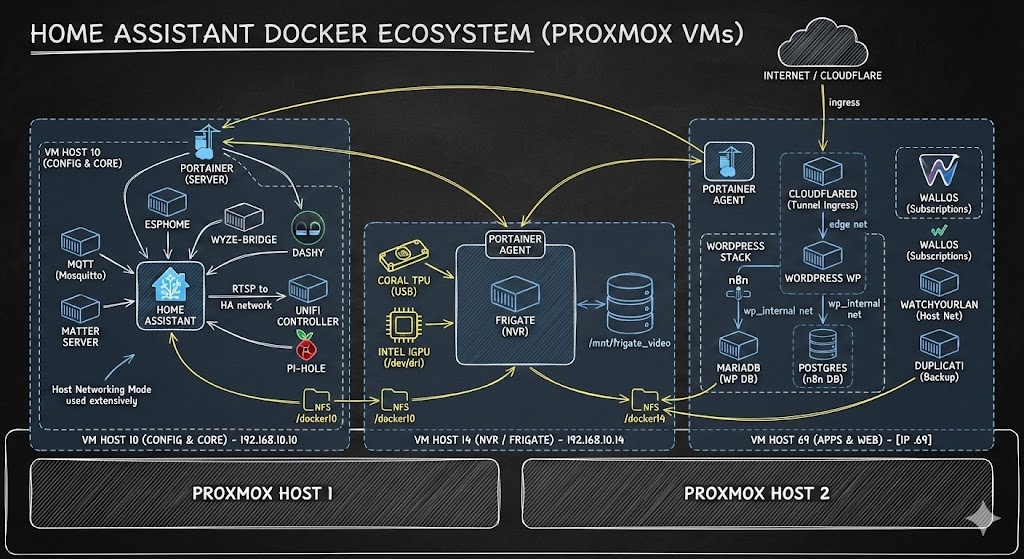
Docker add-ons & utilities
| Container | Repo/Docs | Purpose |
|---|---|---|
| Home Assistant Time Machine | saihgupr/HomeAssistantTimeMachine | Browse/diff/restore HA YAML (Lovelace, automations, scripts, ESPHome, packages) against existing backups. Blog walkthrough: Time Machine for dashboards. |
| Duplicati | duplicati/duplicati | Off-box, versioned backups for HA config and media. |
| Dozzle | amir20/dozzle | Lightweight Docker log viewer (useful for quick tailing across the homelab stacks). |
| Cloudflared | cloudflare/cloudflared | Secure tunnel/edge access to Home Assistant without opening inbound ports. |
| WordPress | wordpress | Hosts vCloudInfo.com for docs, how-tos, videos, and long-form writeups that accompany this config. |
Gear tied to real automations (affiliate links)
Only listing hardware that appears in active packages/automations here. https://amzn.to/48jVzZ3
| Device | What it drives (friendly name -> file) | Buy |
|---|---|---|
| Garadget garage door controller | Garage doors: open/close, reflection alerts - garadget package |  |
| August smart lock | Front-door lock control + status - august package |  |
| Phyn Plus water shutoff | Leak detection + auto shutoff - phynplus package |  |
| Rachio sprinkler controller | Rain-skips and seasonal watering - rachio package |  |
| Tesla Powerwall 2 | Grid-outage alerts + load-shed automations - powerwall package |  |
| NodeMCU motion sensor | Office motion lighting - office_motion package |  |
| Raspberry Pi 3 + Aeon Z-Wave stick | Z-Wave backbone for door/hall sensors - garage entry helper |   |
| Roku streaming device | TV presence -> scenes/lighting - roku package |  |
| Amazon Dash Button | Quick actions (office lamp toggle) - dash buttons automation |  |
| Amazon Echo Show | Front door camera pop-up when the August lock unlocks - august package |  |
| Dreame/Neato vacuum | Cleaning schedules + notifications - vacuum package |  |
| Flux/LED strip controller | Monthly color scenes for exterior - monthly color scene |  |
| Etekcity/433MHz outlet | Accent lighting relays - garage entry helper |  |
Gear and affiliate links
- Browsing or purchasing through the affiliate links above helps support this project; thanks!
All of my configuration files are tested against the most stable version of home-assistant.

Still have questions on my Config?
Message me on X :